 Air purifiers aren’t typically products I would describe as cool. They’re practical appliances designed to do an important job, but most are meant to quietly blend into the background. After spending time with the DREO Air Purifier 530S, I think this one is different.
DREO recently unveiled the 530S as the flagship of its new air purifier lineup, combining its TurboPure technology with smart air-quality monitoring, app controls, and AI-powered RGBIC lighting. After using it in my own space, I came away liking the 530S a lot. It’s compact, easy to operate, surprisingly quiet, and, most importantly, I was impressed by how it performed when I put it to the test.
Getting started was simple. Inside the compact package, I found the purifier, paperwork, and a small two-piece cleaning brush. DREO also includes six pre-filters, with one already installed. Before using the purifier for the first time, I removed the locking cap underneath, pulled out the main filter, and removed its protective plastic. The pre-filter wraps around the main filter and is secured with Velcro, so I had everything ready to go within a few minutes.
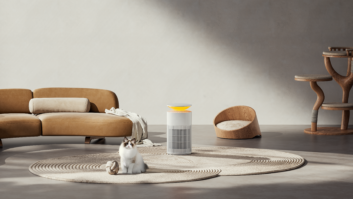
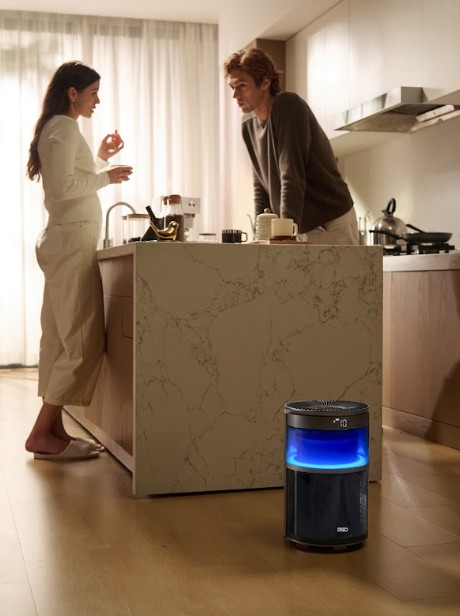
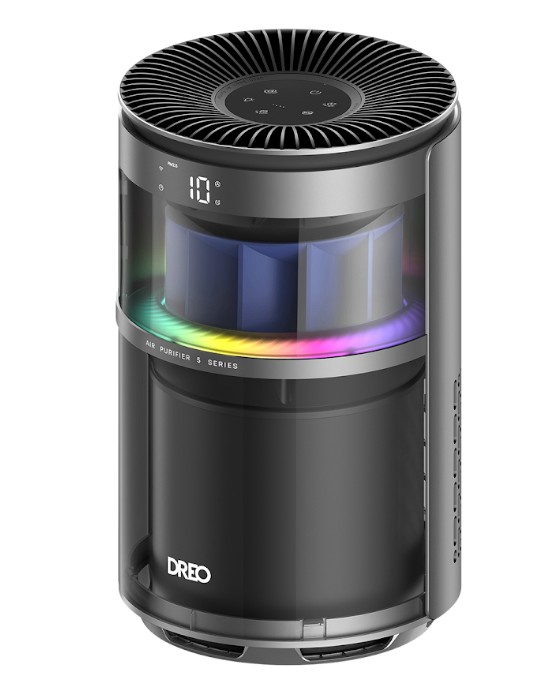
At approximately 15.5 inches tall and 9.25 inches in diameter, the 530S doesn’t take up much space. I tested it in my office, where its compact footprint made it easy to find a spot without having another large appliance in the way. The attached six-foot power cord also provided enough flexibility for placement.
I like the modern black-and-gray finish, although I wouldn’t mind seeing DREO eventually offer all-black or all-white versions. Once the RGBIC lighting comes on, however, the 530S definitely has more personality than your typical air purifier.
 Connecting it to the DREO app was straightforward. From my phone, I could monitor air quality, change fan speeds, check filter life, create schedules, and customize the lighting. The 530S also works with Amazon Alexa and Google Home for voice control.
I found the app responsive and the connection reliable, but scheduling became one of my favorite features. Although Auto mode can automatically respond to changing air quality, I prefer having the purifier run at medium speed during specific times of the day. I can set the schedule and essentially forget about it, which is exactly how I want a smart-home appliance to work.
Of course, none of those features matter much if an air purifier can’t actually clean the air.
The 530S uses a three-stage filtration system. The pre-filter captures larger particles such as dust and hair, while the HEPA filtration stage targets smaller airborne particles. An activated-carbon layer is designed to help reduce odors from sources such as cooking, smoke, and pets. DREO rates the 530S for spaces up to 967 square feet at one air change per hour, and it has an AHAM-certified CADR of 130 CFM.
Those specifications sound good, but I wanted to see what the 530S could actually do.
I tested it in my approximately 140-square-foot office while doing some soldering. The fumes gave me an opportunity to see how the purifier’s PM2.5 sensor responded to a sudden change in air quality and how quickly the 530S could bring the reading back down.
 During my test, the PM2.5 reading climbed to 100. Once I finished soldering, I started a timer and let the purifier go to work.
It took about 9 minutes for the reading to drop from 100 to 12. At around the 14-minute mark, it had fallen all the way to 1.
That was what really impressed me about the 530S. Rather than simply hearing the fan running and assuming the purifier was doing something, I could actually watch the air-quality numbers improve. It was also a good demonstration of the PM2.5 sensor and Auto mode working together, with the purifier detecting the change and adjusting its performance accordingly.
For me, that real-world result says more than simply reading the coverage specifications on the box.
I was also impressed with how quiet the 530S can be. The app provides four manual fan settings along with Auto, Turbo, and Sleep modes. DREO rates Sleep mode as low as 18 dB, and I found it quiet enough to leave running while I was working without it becoming distracting. Turbo mode is naturally more noticeable. I measured it at around 62 dB, but I didn’t find the noise excessive considering the additional airflow.
Then there’s one of my favorite features: the RGBIC lighting.
Through the app, I can adjust brightness, select different colors, and choose from eight lighting effects. There are also six preset scenes, and individual effects can be customized by changing things such as color, speed, and direction.
DREO even incorporates AI into the lighting controls. I can describe the type of effect I want, and the app will generate one for me. Do I need AI-generated lighting on an air purifier? No. But I like it. It makes the 530S more interesting and gives it a smart-home feel that separates it from many other air purifiers.
The lighting isn’t purely cosmetic either. In indicator mode, it changes color based on the current air quality, so I can glance across the room and get a quick idea of conditions without opening the app.
My Take
After using the DREO Air Purifier 530S, I came away genuinely impressed. I like its compact design, scheduling controls, quiet operation, and the ability to monitor what’s happening with my air quality in real time. And yes, I really like the RGBIC lighting.
But the biggest reason I’m positive about the 530S is simple: I saw it work.
Watching the PM2.5 reading in my office fall from 100 to 12 in nine minutes and eventually reach 1 gave me a tangible demonstration of its performance.
The 530S also fits nicely with DREO’s broader DREO Air Intelligence initiative. The combination of sensors, automation, app controls, and AI could easily feel like technology for technology’s sake, but here most of it contributes to making the purifier easier and more enjoyable to use.
I’d welcome additional color choices and would like to see the historical-data discrepancy addressed, but those are relatively minor issues in what was otherwise a very positive experience.
The DREO Air Purifier 530S is compact, smart, quiet, and easy to use, and my own testing left me impressed with its performance.
And I’ll say something I don’t normally say about an air purifier: I think it looks pretty cool, too. For more information, go to www.DREO.com.
See also: DREO Whole-Room Heater 720S Review: A Smarter Way To Stay Warm